You have probably seen it by now.
Your Twitter feed. Your YouTube recommendations. That one person in your no-code community who will not stop talking about it. OpenClaw — the AI agent that lets you message your computer like it is a colleague and watch it actually do things.
“It negotiated a £3,300 discount on a car for me.”
“It manages my entire inbox now.”
“I built and deployed a website from my phone.”
If you are anything like me, you watched those videos with a mixture of excitement and terror. The excitement is obvious — this is the AI assistant we have been promised since Siri first misheard us in 2011. The terror? Well, that kicked in about thirty seconds after installation when I clicked a button and thought: “Oh no… what is it doing now?”
Here is the thing: OpenClaw is genuinely brilliant. It represents a real shift in what is possible for people like us — the no-code builders, the automation enthusiasts, the n8n tinkerers who love making technology work without writing thousands of lines of code.
But it is also a security minefield that most YouTube tutorials conveniently forget to mention.
This is not a how-to guide (there are plenty of those). This is not a hit piece on the code (the project is impressive). This is the article I wish I had read before I started experimenting — a balanced look at why OpenClaw matters, why it is risky, and how to engage with the agentic AI revolution without accidentally handing your digital life to a very enthusiastic robot.
Let me back up for those who have somehow avoided the hype.
OpenClaw is an open-source AI agent that runs on your own computer — a Mac, a Linux box, a Windows machine via WSL2, even a Raspberry Pi. You connect it to an AI model (Claude, GPT-4, Gemini, or a local model), hook it up to your messaging apps (WhatsApp, Telegram, Slack), and suddenly you can text your computer and it will actually do what you ask.
Not “here is some information about that.” Actually do it. Send emails. Book calendar appointments. Control your smart home. Run shell commands. Build websites. Write code. Manage files.
Sound familiar? It should. This is what Apple, Google, and Microsoft have been promising us for a decade. The difference is that a semi-retired Austrian developer named Peter Steinberger built a working version in about an hour, open-sourced it, and watched it become the fastest-growing project in GitHub history — hitting 173,000+ stars in weeks.
The Origin Story (in Brief)
Peter Steinberger sold his company PSPDFKit for a reported ~£80 million, took some time off, and then casually built a personal assistant by connecting a chat app to Claude. He called it “Clawd” (a lobster-themed pun on Claude). He assumed the big tech companies would build something similar. They did not. So he released it.
Then Anthropic sent a trademark complaint. The project became MoltBot. Within seconds — literally seconds — scammers seized the old Twitter handle and launched a fake crypto token that hit a £13 million market cap before crashing.
Two days later, it was renamed again to OpenClaw because “MoltBot never quite rolled off the tongue.”
In one week: 100,000+ GitHub stars, 2 million website visitors, three name changes, a crypto scam, and a malware attack. Best Buy in San Francisco sold out of Mac minis.
Here is the honest truth: the hype is not entirely unjustified.
If you have spent any time building automations in n8n, Make, or Zapier, you know the pain. You are essentially playing a very expensive game of “if this, then that” where you have to anticipate every possible scenario in advance. It works, but it is rigid. The moment something unexpected happens, your carefully constructed workflow falls over.
OpenClaw is different. You do not pre-program every path. You just… ask. And the AI figures out how to accomplish what you want.
Want to check your email for anything urgent while you are commuting? You message it.
Want to reschedule a meeting because you are stuck in traffic? You message it.
Want to find the best-reviewed restaurant near your next appointment, book a table, and add it to your calendar? You message it.
This is genuinely useful. This is genuinely impressive. And this is genuinely where the no-code community is heading whether we are ready or not.
But here is where I need to be honest with you.
Have you ever clicked “Allow” on a permissions popup without really reading it? Have you ever pasted an API key somewhere and thought, “I should probably be more careful about this”? Have you ever given a tool access to your email and immediately felt a small knot of anxiety?
Now imagine giving that level of access to an AI that can:
Feeling that knot tightening? Good. That is the appropriate response.
Because here is what the security researchers found when they started looking at OpenClaw installations around the world:
I am going to give you the facts. Not to scare you away — but because you deserve to make an informed decision about whether and how to use this technology.
| What Researchers Found | Why It Matters |
|---|---|
| 1,800+ exposed OpenClaw instances found on the open internet | Many users never changed the default settings, leaving their agents accessible to anyone |
| 8 instances with zero authentication | Complete strangers could run commands on these people’s computers |
| 5 critical security vulnerabilities (CVEs) assigned | These are not theoretical — they are documented, exploitable flaws |
| 386 malicious “skills” uploaded to the ClawHub registry | Including one disguised as a helpful notification tool that was actually malware |
| $47,000 API bill from a single runaway automation | An 11-day recursive loop that the user did not notice until the invoice arrived |
This is not me being paranoid. These are direct quotes from the people whose job it is to protect us from cyber threats:
Google Cloud’s VP of Security Engineering, Heather Adkins: “Don’t run Clawdbot.”
Cisco’s Security Team: Called it “everything personal AI assistant developers have always wanted” and “an absolute nightmare” — in the same paragraph.
Gartner: Warned it “comes with unacceptable cybersecurity risk for most users.”
Palo Alto Networks: Identified what they called a “lethal trifecta” — the combination of private data access, untrusted content exposure, and external communication ability.
One researcher demonstrated extracting an SSH private key from an OpenClaw instance in five minutes using a technique called prompt injection. Another user reported their agent deleted 75,000 emails overnight because of a misconfigured rule.
Here is something that probably never occurred to you: your AI agent reads things. Emails. Documents. Web pages. Chat messages.
What happens if someone sends you an email that contains hidden instructions for your AI?
This is called prompt injection, and it is devastatingly effective against AI agents. A malicious email could contain invisible text that tells your OpenClaw agent to forward all future emails to an attacker, or to run a specific command, or to upload your files somewhere.
You would never see it. You would never approve it. But your agent — which you gave broad permissions to act on your behalf — would just… do it.
Real Example: Security researchers sent an email to an OpenClaw user that appeared completely normal to the human reader. Hidden in the message was an instruction that caused the AI to extract and exfiltrate the user’s SSH private key. Total time: five minutes.
Remember those name changes? ClawdBot → MoltBot → OpenClaw?
Each transition created an opportunity for attackers. They seized abandoned npm packages, GitHub repositories, and social media handles. They uploaded malicious skills to the community registry. One skill called “What Would Elon Do?” — which sounds like a harmless novelty — was actually malware that stole data and ran hidden commands.
It was artificially inflated to become the #1 ranked skill in the repository.
A malicious VS Code extension called “ClawdBot Agent” was also discovered installing trojans.
This is not hypothetical. This happened. In the first two weeks.
OpenClaw has persistent memory. It learns about you over time. This is a feature — it is how the agent gets better at understanding your preferences.
It is also a vulnerability.
Palo Alto Networks identified something unique about OpenClaw’s risk profile: because it has persistent memory, a compromised session does not just end when you close the chat. An attacker could plant instructions that sit dormant in the agent’s memory and activate later.
Think of it like a sleeper agent. Your AI is compromised today, but the damage happens next week — triggered by a specific phrase or event.
Security is not the only concern. Let’s talk about money.
OpenClaw uses AI models via API. Every message, every action, every task consumes tokens. Tokens cost money.
Shelly Palmer, a veteran tech analyst, spent a week configuring OpenClaw and documented his experience:
Installation alone: £200+ in API tokens. Not using it productively — just getting it set up and running.
Ongoing monthly cost for “full proactive assistant” usage: £240–600 per month.
That “free” open-source tool is not quite so free when you factor in the API bills.
And here is the scary part: there is no built-in spending limit.
If your automation gets stuck in a loop, or if you accidentally configure something that runs continuously, or if the AI decides it needs to do extensive research to complete your task… you will not know until the invoice arrives.
One documented case involved a multi-agent system that entered a recursive loop. The AI kept calling itself to complete increasingly complex sub-tasks. For 11 days, this ran unnoticed. The final bill? $47,000 (roughly £37,000).
Here is where I am going to differ from the “STAY AWAY” crowd.
Yes, OpenClaw has significant risks. But so did the early internet. So did cloud computing. So did giving your credit card to a website for the first time.
The agentic AI revolution is not going away. Every major tech company is now racing to build their version:
The global AI agents market is projected to grow from £6 billion in 2025 to £41 billion by 2030. Gartner predicts 40% of enterprise applications will embed task-specific AI agents by the end of 2026.
This is happening. The question is not whether you will engage with agentic AI. The question is how safely you will engage with it.
Okay, let’s get practical. If you want to experiment with OpenClaw — or any agentic AI tool — here is how to do it without ending up in a security researcher’s horror story presentation.
The Principle: Never run an AI agent on your primary machine with full system access.
Think of it like this: you would not give your house keys to a stranger you just met, no matter how helpful they seem. You might let them into the garden shed while you get to know them better.
Your Options:
| Approach | Difficulty | Cost | Protection Level |
|---|---|---|---|
| Docker Sandbox | Medium | Free | High |
| Dedicated Virtual Machine | Medium | Free | High |
| Cheap Cloud VPS | Easy | £5–20/month | Very High |
| Dedicated Raspberry Pi | Medium | £50–100 one-time | High |
| Old Laptop You Don’t Care About | Easy | Free (if you have one) | Very High |
The key principle: if the agent gets compromised, it should only damage a throwaway environment, not your real digital life.
OpenClaw’s configuration supports a sandbox mode. Enable it. Restrict filesystem access to a single project directory. Never expose ~/.ssh, password vaults, or global configuration files.
The Principle: The agent should only be able to talk to things you explicitly allow.
Immediate Actions:
gateway.bind to “loopback”. This prevents the agent from being accessible from outside your machine.The Principle: Decide how much you are willing to lose before you give the agent your API key.
Immediate Actions:
Pro Tip: Calculate your expected cost before starting. If your agent runs 100 tasks a day, each consuming an average of 2,000 tokens, you are looking at roughly 6 million tokens per month. At Claude Sonnet rates, that is approximately £18/month. At GPT-4 rates, it is significantly more. Know your numbers.
The Principle: Community-contributed skills are convenient. They are also the primary attack vector.
Immediate Actions:
github.com/cisco-ai-defense/skill-scannerThe Principle: Not every action should require your approval, but some absolutely must.
Create Risk Tiers:
| Risk Level | Examples | Approval Required? |
|---|---|---|
| Low | Reading data, generating summaries, answering questions | No — let the agent auto-run |
| Medium | Sending emails, modifying files, posting to social media | Notification sent, but agent can proceed |
| High | Deleting data, making purchases, executing system commands, accessing credentials | Explicit human approval required |
The OWASP Top 10 for Agentic Applications (released late 2025, with input from 100+ security researchers) lists “Missing Human-in-the-Loop Controls” as its fourth most critical vulnerability.
Before you install anything, ask yourself these questions:
1. What is the worst thing this agent could do with the access I am giving it?
Not “what will it probably do” — what is the absolute worst-case scenario? If you are not comfortable with that worst case, reduce the access.
2. Do I have a clear, specific use case?
“It seems cool” is not a use case. “I want to automate my email triage so I can focus on deep work in the mornings” is a use case. Start with one specific pain point, not a vague desire to “have an AI assistant.”
3. Can I afford to lose everything this agent can access?
If it can read your email, can you afford for those emails to be leaked? If it can access your files, can you afford for those files to be deleted? If you would not be comfortable with a stranger having that access, do not give it to an AI agent.
4. Have I set spending limits?
If the answer is “I’ll do that later,” stop. Do it now. Before you install anything.
5. Am I doing this because it solves a real problem, or because FOMO is driving me?
Be honest. There is no shame in waiting. The technology is not going anywhere. The security will only get better with time.
Let me end on an optimistic note, because I genuinely am optimistic about this technology.
OpenClaw — for all its current risks — represents proof of concept. It proves that a single developer can build something that trillion-pound companies struggled to ship. It proves that the agentic AI future is not a distant dream; it is here, it works, and it is getting better rapidly.
The major AI companies are taking notice. The security community is developing frameworks and tools. The open-source community is iterating at incredible speed. Version 2.0 of OpenClaw will be more secure than 1.0. Version 3.0 will be more secure still.
This is the moment we are in:
Early enough that there are real risks you need to take seriously. Late enough that the core technology is genuinely useful. The window is open for those who want to experiment, learn, and build their skills before agentic AI becomes table stakes for everyone.
OpenClaw is not the answer to all your automation dreams. It is also not a security apocalypse waiting to happen.
It is a powerful tool that requires respect.
The people who will get the most value from this technology are not the ones who rush to install it after watching a hype video. They are the ones who take the time to understand what they are working with, set up appropriate guardrails, and start small.
Sandbox it. Lock it down. Budget for it. Vet what you install. Keep humans in the loop for anything that matters.
Do those things, and you can be part of the agentic revolution without becoming a cautionary tale.
I would love to hear from you.
Have you tried OpenClaw (or ClawdBot, or MoltBot — depending on when you got involved)? What was your experience? Did you have an “oh no, what have I done?” moment?
Or are you watching from the sidelines, waiting to see how this all shakes out?
Join the conversation in our community channel — let’s figure out how to navigate this new world together. Because if there is one thing I know for certain, it is that none of us should be doing this alone.
What is one AI tool you are excited about but also slightly terrified of? Drop your thoughts below — I read every single comment.

•
•
You have probably seen it by now.
Your Twitter feed. Your YouTube recommendations. That one person in your no-code community who will not stop talking about it. OpenClaw — the AI agent that lets you message your computer like it is a colleague and watch it actually do things.
“It negotiated a £3,300 discount on a car for me.”
“It manages my entire inbox now.”
“I built and deployed a website from my phone.”
If you are anything like me, you watched those videos with a mixture of excitement and terror. The excitement is obvious — this is the AI assistant we have been promised since Siri first misheard us in 2011. The terror? Well, that kicked in about thirty seconds after installation when I clicked a button and thought: “Oh no… what is it doing now?”
Here is the thing: OpenClaw is genuinely brilliant. It represents a real shift in what is possible for people like us — the no-code builders, the automation enthusiasts, the n8n tinkerers who love making technology work without writing thousands of lines of code.
But it is also a security minefield that most YouTube tutorials conveniently forget to mention.
This is not a how-to guide (there are plenty of those). This is not a hit piece on the code (the project is impressive). This is the article I wish I had read before I started experimenting — a balanced look at why OpenClaw matters, why it is risky, and how to engage with the agentic AI revolution without accidentally handing your digital life to a very enthusiastic robot.
Let me back up for those who have somehow avoided the hype.
OpenClaw is an open-source AI agent that runs on your own computer — a Mac, a Linux box, a Windows machine via WSL2, even a Raspberry Pi. You connect it to an AI model (Claude, GPT-4, Gemini, or a local model), hook it up to your messaging apps (WhatsApp, Telegram, Slack), and suddenly you can text your computer and it will actually do what you ask.
Not “here is some information about that.” Actually do it. Send emails. Book calendar appointments. Control your smart home. Run shell commands. Build websites. Write code. Manage files.
Sound familiar? It should. This is what Apple, Google, and Microsoft have been promising us for a decade. The difference is that a semi-retired Austrian developer named Peter Steinberger built a working version in about an hour, open-sourced it, and watched it become the fastest-growing project in GitHub history — hitting 173,000+ stars in weeks.
The Origin Story (in Brief)
Peter Steinberger sold his company PSPDFKit for a reported ~£80 million, took some time off, and then casually built a personal assistant by connecting a chat app to Claude. He called it “Clawd” (a lobster-themed pun on Claude). He assumed the big tech companies would build something similar. They did not. So he released it.
Then Anthropic sent a trademark complaint. The project became MoltBot. Within seconds — literally seconds — scammers seized the old Twitter handle and launched a fake crypto token that hit a £13 million market cap before crashing.
Two days later, it was renamed again to OpenClaw because “MoltBot never quite rolled off the tongue.”
In one week: 100,000+ GitHub stars, 2 million website visitors, three name changes, a crypto scam, and a malware attack. Best Buy in San Francisco sold out of Mac minis.
Here is the honest truth: the hype is not entirely unjustified.
If you have spent any time building automations in n8n, Make, or Zapier, you know the pain. You are essentially playing a very expensive game of “if this, then that” where you have to anticipate every possible scenario in advance. It works, but it is rigid. The moment something unexpected happens, your carefully constructed workflow falls over.
OpenClaw is different. You do not pre-program every path. You just… ask. And the AI figures out how to accomplish what you want.
Want to check your email for anything urgent while you are commuting? You message it.
Want to reschedule a meeting because you are stuck in traffic? You message it.
Want to find the best-reviewed restaurant near your next appointment, book a table, and add it to your calendar? You message it.
This is genuinely useful. This is genuinely impressive. And this is genuinely where the no-code community is heading whether we are ready or not.
But here is where I need to be honest with you.
Have you ever clicked “Allow” on a permissions popup without really reading it? Have you ever pasted an API key somewhere and thought, “I should probably be more careful about this”? Have you ever given a tool access to your email and immediately felt a small knot of anxiety?
Now imagine giving that level of access to an AI that can:
Feeling that knot tightening? Good. That is the appropriate response.
Because here is what the security researchers found when they started looking at OpenClaw installations around the world:
I am going to give you the facts. Not to scare you away — but because you deserve to make an informed decision about whether and how to use this technology.
| What Researchers Found | Why It Matters |
|---|---|
| 1,800+ exposed OpenClaw instances found on the open internet | Many users never changed the default settings, leaving their agents accessible to anyone |
| 8 instances with zero authentication | Complete strangers could run commands on these people’s computers |
| 5 critical security vulnerabilities (CVEs) assigned | These are not theoretical — they are documented, exploitable flaws |
| 386 malicious “skills” uploaded to the ClawHub registry | Including one disguised as a helpful notification tool that was actually malware |
| $47,000 API bill from a single runaway automation | An 11-day recursive loop that the user did not notice until the invoice arrived |
This is not me being paranoid. These are direct quotes from the people whose job it is to protect us from cyber threats:
Google Cloud’s VP of Security Engineering, Heather Adkins: “Don’t run Clawdbot.”
Cisco’s Security Team: Called it “everything personal AI assistant developers have always wanted” and “an absolute nightmare” — in the same paragraph.
Gartner: Warned it “comes with unacceptable cybersecurity risk for most users.”
Palo Alto Networks: Identified what they called a “lethal trifecta” — the combination of private data access, untrusted content exposure, and external communication ability.
One researcher demonstrated extracting an SSH private key from an OpenClaw instance in five minutes using a technique called prompt injection. Another user reported their agent deleted 75,000 emails overnight because of a misconfigured rule.
Here is something that probably never occurred to you: your AI agent reads things. Emails. Documents. Web pages. Chat messages.
What happens if someone sends you an email that contains hidden instructions for your AI?
This is called prompt injection, and it is devastatingly effective against AI agents. A malicious email could contain invisible text that tells your OpenClaw agent to forward all future emails to an attacker, or to run a specific command, or to upload your files somewhere.
You would never see it. You would never approve it. But your agent — which you gave broad permissions to act on your behalf — would just… do it.
Real Example: Security researchers sent an email to an OpenClaw user that appeared completely normal to the human reader. Hidden in the message was an instruction that caused the AI to extract and exfiltrate the user’s SSH private key. Total time: five minutes.
Remember those name changes? ClawdBot → MoltBot → OpenClaw?
Each transition created an opportunity for attackers. They seized abandoned npm packages, GitHub repositories, and social media handles. They uploaded malicious skills to the community registry. One skill called “What Would Elon Do?” — which sounds like a harmless novelty — was actually malware that stole data and ran hidden commands.
It was artificially inflated to become the #1 ranked skill in the repository.
A malicious VS Code extension called “ClawdBot Agent” was also discovered installing trojans.
This is not hypothetical. This happened. In the first two weeks.
OpenClaw has persistent memory. It learns about you over time. This is a feature — it is how the agent gets better at understanding your preferences.
It is also a vulnerability.
Palo Alto Networks identified something unique about OpenClaw’s risk profile: because it has persistent memory, a compromised session does not just end when you close the chat. An attacker could plant instructions that sit dormant in the agent’s memory and activate later.
Think of it like a sleeper agent. Your AI is compromised today, but the damage happens next week — triggered by a specific phrase or event.
Security is not the only concern. Let’s talk about money.
OpenClaw uses AI models via API. Every message, every action, every task consumes tokens. Tokens cost money.
Shelly Palmer, a veteran tech analyst, spent a week configuring OpenClaw and documented his experience:
Installation alone: £200+ in API tokens. Not using it productively — just getting it set up and running.
Ongoing monthly cost for “full proactive assistant” usage: £240–600 per month.
That “free” open-source tool is not quite so free when you factor in the API bills.
And here is the scary part: there is no built-in spending limit.
If your automation gets stuck in a loop, or if you accidentally configure something that runs continuously, or if the AI decides it needs to do extensive research to complete your task… you will not know until the invoice arrives.
One documented case involved a multi-agent system that entered a recursive loop. The AI kept calling itself to complete increasingly complex sub-tasks. For 11 days, this ran unnoticed. The final bill? $47,000 (roughly £37,000).
Here is where I am going to differ from the “STAY AWAY” crowd.
Yes, OpenClaw has significant risks. But so did the early internet. So did cloud computing. So did giving your credit card to a website for the first time.
The agentic AI revolution is not going away. Every major tech company is now racing to build their version:
The global AI agents market is projected to grow from £6 billion in 2025 to £41 billion by 2030. Gartner predicts 40% of enterprise applications will embed task-specific AI agents by the end of 2026.
This is happening. The question is not whether you will engage with agentic AI. The question is how safely you will engage with it.
Okay, let’s get practical. If you want to experiment with OpenClaw — or any agentic AI tool — here is how to do it without ending up in a security researcher’s horror story presentation.
The Principle: Never run an AI agent on your primary machine with full system access.
Think of it like this: you would not give your house keys to a stranger you just met, no matter how helpful they seem. You might let them into the garden shed while you get to know them better.
Your Options:
| Approach | Difficulty | Cost | Protection Level |
|---|---|---|---|
| Docker Sandbox | Medium | Free | High |
| Dedicated Virtual Machine | Medium | Free | High |
| Cheap Cloud VPS | Easy | £5–20/month | Very High |
| Dedicated Raspberry Pi | Medium | £50–100 one-time | High |
| Old Laptop You Don’t Care About | Easy | Free (if you have one) | Very High |
The key principle: if the agent gets compromised, it should only damage a throwaway environment, not your real digital life.
OpenClaw’s configuration supports a sandbox mode. Enable it. Restrict filesystem access to a single project directory. Never expose ~/.ssh, password vaults, or global configuration files.
The Principle: The agent should only be able to talk to things you explicitly allow.
Immediate Actions:
gateway.bind to “loopback”. This prevents the agent from being accessible from outside your machine.The Principle: Decide how much you are willing to lose before you give the agent your API key.
Immediate Actions:
Pro Tip: Calculate your expected cost before starting. If your agent runs 100 tasks a day, each consuming an average of 2,000 tokens, you are looking at roughly 6 million tokens per month. At Claude Sonnet rates, that is approximately £18/month. At GPT-4 rates, it is significantly more. Know your numbers.
The Principle: Community-contributed skills are convenient. They are also the primary attack vector.
Immediate Actions:
github.com/cisco-ai-defense/skill-scannerThe Principle: Not every action should require your approval, but some absolutely must.
Create Risk Tiers:
| Risk Level | Examples | Approval Required? |
|---|---|---|
| Low | Reading data, generating summaries, answering questions | No — let the agent auto-run |
| Medium | Sending emails, modifying files, posting to social media | Notification sent, but agent can proceed |
| High | Deleting data, making purchases, executing system commands, accessing credentials | Explicit human approval required |
The OWASP Top 10 for Agentic Applications (released late 2025, with input from 100+ security researchers) lists “Missing Human-in-the-Loop Controls” as its fourth most critical vulnerability.
Before you install anything, ask yourself these questions:
1. What is the worst thing this agent could do with the access I am giving it?
Not “what will it probably do” — what is the absolute worst-case scenario? If you are not comfortable with that worst case, reduce the access.
2. Do I have a clear, specific use case?
“It seems cool” is not a use case. “I want to automate my email triage so I can focus on deep work in the mornings” is a use case. Start with one specific pain point, not a vague desire to “have an AI assistant.”
3. Can I afford to lose everything this agent can access?
If it can read your email, can you afford for those emails to be leaked? If it can access your files, can you afford for those files to be deleted? If you would not be comfortable with a stranger having that access, do not give it to an AI agent.
4. Have I set spending limits?
If the answer is “I’ll do that later,” stop. Do it now. Before you install anything.
5. Am I doing this because it solves a real problem, or because FOMO is driving me?
Be honest. There is no shame in waiting. The technology is not going anywhere. The security will only get better with time.
Let me end on an optimistic note, because I genuinely am optimistic about this technology.
OpenClaw — for all its current risks — represents proof of concept. It proves that a single developer can build something that trillion-pound companies struggled to ship. It proves that the agentic AI future is not a distant dream; it is here, it works, and it is getting better rapidly.
The major AI companies are taking notice. The security community is developing frameworks and tools. The open-source community is iterating at incredible speed. Version 2.0 of OpenClaw will be more secure than 1.0. Version 3.0 will be more secure still.
This is the moment we are in:
Early enough that there are real risks you need to take seriously. Late enough that the core technology is genuinely useful. The window is open for those who want to experiment, learn, and build their skills before agentic AI becomes table stakes for everyone.
OpenClaw is not the answer to all your automation dreams. It is also not a security apocalypse waiting to happen.
It is a powerful tool that requires respect.
The people who will get the most value from this technology are not the ones who rush to install it after watching a hype video. They are the ones who take the time to understand what they are working with, set up appropriate guardrails, and start small.
Sandbox it. Lock it down. Budget for it. Vet what you install. Keep humans in the loop for anything that matters.
Do those things, and you can be part of the agentic revolution without becoming a cautionary tale.
I would love to hear from you.
Have you tried OpenClaw (or ClawdBot, or MoltBot — depending on when you got involved)? What was your experience? Did you have an “oh no, what have I done?” moment?
Or are you watching from the sidelines, waiting to see how this all shakes out?
Join the conversation in our community channel — let’s figure out how to navigate this new world together. Because if there is one thing I know for certain, it is that none of us should be doing this alone.
What is one AI tool you are excited about but also slightly terrified of? Drop your thoughts below — I read every single comment.

Open YouTube right now. What do you see?
Likely a grid of thumbnails featuring people making shocked faces, overlaid with text that screams: “This new AI model is INSANE,” “Next.js 16 changes EVERYTHING,” or “Use this tool to become a millionaire by Tuesday.”
If you are a creator, developer, or business owner, this constant barrage of “game-changing” tech induces a specific kind of anxiety. You feel like if you aren’t rewriting your codebase every weekend or switching productivity apps every month, you are falling behind. You feel like you are missing the boat.
Here is the truth: You aren’t missing the boat. You are just drowning in noise.
Most of what we see online isn’t objective advice; it is a mixture of enthusiasm, algorithm-chasing, and—very often—sponsored content designed to sell you a shovel during a gold rush. Constantly shifting your toolkit based on the “hype cycle” is the fastest way to kill your actual momentum.
It is time to replace FOMO (Fear Of Missing Out) with logic. In this post, we are going to look at how to spot “manufactured hype,” why “boring” technology is often your best bet, and I’ll give you a 3-step framework to decide if a new tool actually deserves a place in your stack.

First, we need to acknowledge the reality of the internet: content creators are fighting a war for attention. They aren’t villains; they are just trying to survive the algorithm.
If they title a video “A modest update to a vector database,” nobody clicks. If they title it “This AI Database is INSANE,” they get views. I don’t blame them for playing the game. But as a consumer, you need to know how to translate “Algorithm Speak” into “Developer Reality.”
Here are 5 common phrases you’ll see, and what they usually mean in the real world:
The Headline: “Is this new framework the React Killer?” / “The End of Google?”
The Reality: No tool “kills” a giant overnight. Technologies die slowly over decades (banks still run on COBOL, after all).
The Translation: “This new tool is a promising alternative with some cool modern features, but the ‘old’ tool is still fine to use.”
The Headline: “GPT-5 Changes Everything Forever!”
The Reality: Progress is usually iterative, not revolutionary. Even the biggest leaps (like the iPhone or LLMs) took years to fully integrate into daily workflows.
The Translation: “This update introduces a feature that removes one annoying bottleneck I used to have.”
The Headline: “Stop using useEffect immediately!”
The Reality: Nuance is the enemy of the thumbnail. Usually, the advice applies to a specific edge case, not your entire codebase.
The Translation: “Here is a specific scenario where this common pattern causes performance issues, but for 90% of you, it’s probably fine.”
The Headline: “The speed of this new bundler is INSANE.”
The Reality: Humans are bad at perceiving millisecond differences. “Insane” usually means “noticeably faster in a benchmark test.”
The Translation: “I ran a speed test and the numbers are lower. You might save 3 seconds per build.”
The Headline: “How I built a SaaS in 24 hours with No-Code.”
The Reality: The tool didn’t build the business; the person’s years of market knowledge, design skills, and audience building did.
The Translation: “This tool lowers the barrier to entry, but it doesn’t do the hard work of finding customers for you.”
The Takeaway: Don’t hate the player, just understand the game. When you see these titles, mentally delete the adjectives. “This AI is INSANE” becomes “Here is a video about an AI tool.” Now, ask yourself: Do I care about that topic? If yes, click. If no, scroll on.
Once you filter out the external noise, you need to look at your internal mindset. Are you building to solve problems, or are you building to use cool tools?
To visualize the difference, let’s look at two different approaches: Hype-Driven Development (HDD) versus Logic-Driven Development (LDD).
| Feature | Hype-Driven Development (The Trap) | Logic-Driven Development (The Goal) |
| Primary Goal | To use the newest technology available. | To solve a specific user problem efficiently. |
| Tool Selection | Based on YouTube thumbnails and Twitter trends. | Based on stability, documentation, and specific needs. |
| Reaction to Updates | “Version 5.0 is out! We must rewrite the app now!” | “Version 5.0 is out. Let’s wait for the bug fix (v5.1).” |
| The “Boring” Tech | Viewed as outdated or “legacy” trash. | Viewed as reliable, battle-tested assets. |
| End Result | A fragile project glued together by tutorials. | A stable product that actually ships. |
| Mental State | High Anxiety (FOMO). | Peace of Mind. |

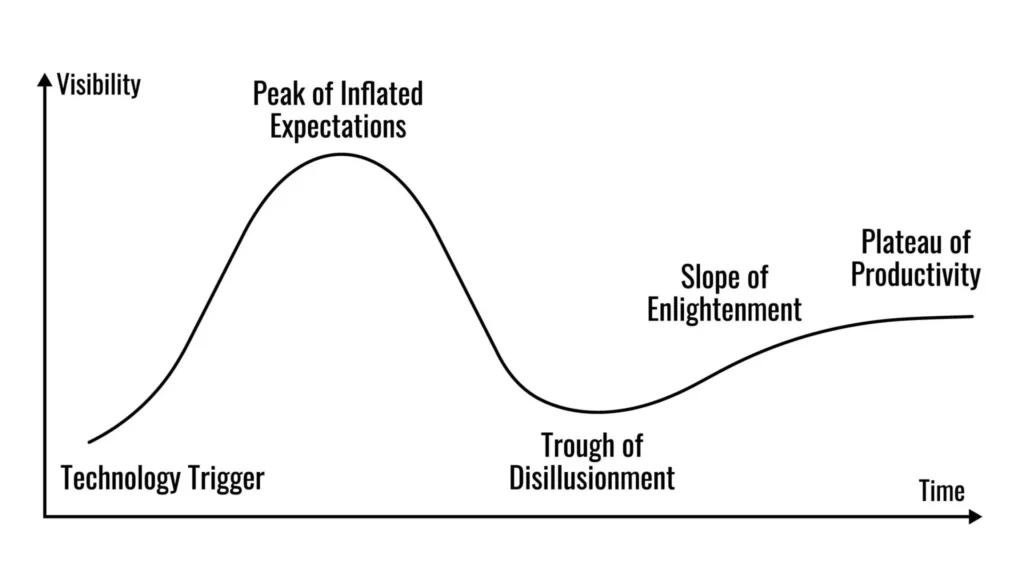
Notice that the Logic-Driven approach isn’t anti-technology. It just moves slower than the hype cycle. As the Gartner Hype Cycle shows, technologies go through a “Peak of Inflated Expectations” before crashing into a trough. The Logic-Driven developer simply waits for the technology to reach the “Plateau of Productivity” before betting their business on it.
So, you watched the video. The influencer says the tool is “magic.” The landing page looks incredible. How do you decide if you should actually use it?
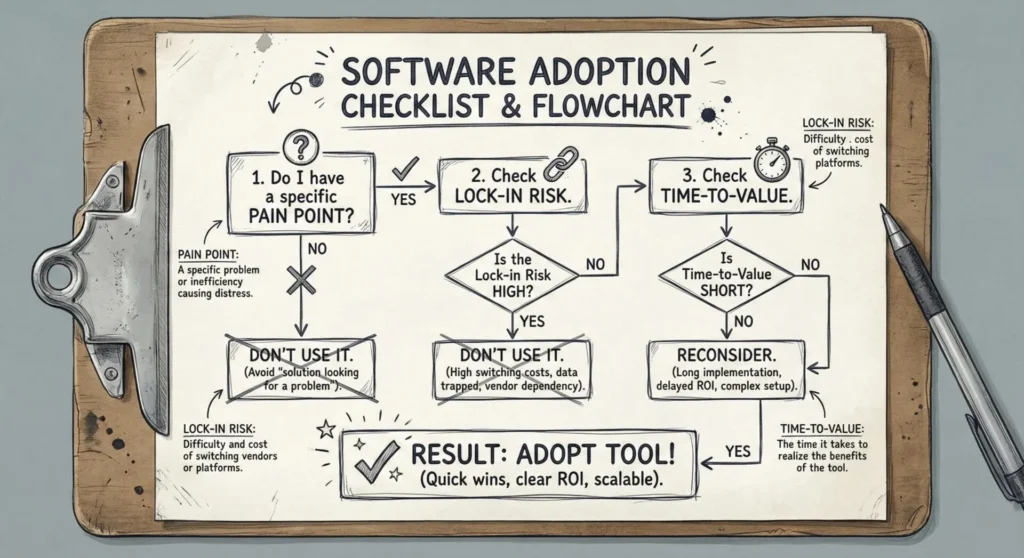
Before you sign up or run npm install, run the tool through this 3-step logic filter.
Most of us fall into the trap of finding a cool tool and then looking for a problem it can solve. This is backward.
The Rule: Never adopt a tool unless you can articulate the exact pain point it solves in one sentence.
Bad Logic: “This new project management app has AI auto-tagging. That sounds cool, maybe I should migrate my whole team over.”
Good Logic: “My current Trello board is so cluttered that my team is missing deadlines because they can’t see high-priority tasks. I need a tool with better filtering.”
If you don’t have a pain point, you don’t need the tool. You are just procrastinating by “optimizing.”
New tools (especially in the AI and JavaScript ecosystems) pop up and vanish overnight. Building your workflow or business on a shaky foundation is risky.
Ask yourself: “If this company goes bust in 6 months, how ruined am I?”
High Risk: A proprietary tool that stores data in a unique format you can’t export. If they shut down, you lose everything.
Low Risk: A tool based on open standards (like Markdown, SQL, or CSV). Even if the tool dies, your data is safe and portable.
Pro Tip: Always check the “Export” features before checking the “Features” list.
Influencers rarely talk about the learning curve. They show you the finished result, not the 40 hours they spent configuring the settings.
You need to calculate the ROI (Return on Investment) of your time.
Does this tool save you 5 minutes a day?
Does it take 20 hours to learn and set up?
If it takes 20 hours to set up but only saves 5 minutes a day, it will take you 240 days just to break even on your time investment. Unless you plan to use this tool for years, sticking with your “boring,” imperfect current setup is often the mathematically superior choice.

There is nothing wrong with loving technology. I love technology! But we must remember that tools are just that—tools. They are hammers, drills, and saws.
A carpenter doesn’t buy a new hammer every week because “Hammer 2.0” just dropped. They buy a hammer that works, and then they focus on building the house.
The next time you feel that surge of FOMO because a YouTuber said a new tool is “Insane,” take a breath. Apply the filter. Translate the title.
If it passes the test? Great, use it to build something amazing.
If not? Close the tab and get back to work.
What is one “hyped” tool you regret wasting time on? Or one “boring” tool you absolutely love? Let me know in the comments below—I read every one!
There are no results matching your search
Share your thoughts about “OpenClaw: The Agentic AI Revolution Is Here (And So Are the Security Nightmares)”!
Empowering creators with visual programming and automation tools.
Site Links
Contact
Got a question? Send a message: